WordPress Plugin v3.0.1
RecMan Plugin for WordPress.
Sync jobs automatically.
A WordPress plugin that connects to the RecMan API and publishes your job postings on your own site — with smart caching, built-in SEO, and full design control. Built for recruitment agencies, staffing companies, and the developers who build for them.
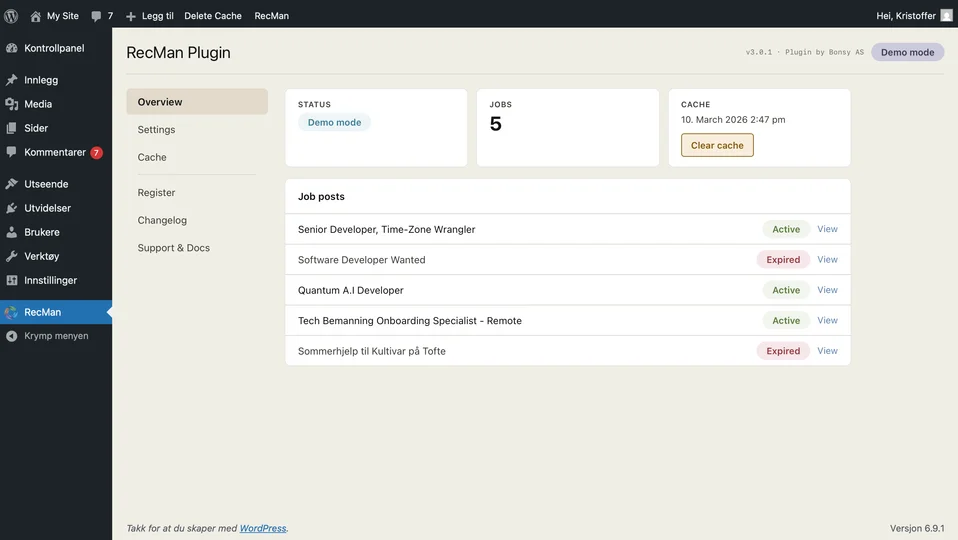
What is the RecMan WordPress Plugin?
The RecMan WordPress Plugin is a plugin built by Bonsy AS that connects a WordPress website to the RecMan recruitment platform. It fetches your published job postings through the RecMan API, caches them locally, and displays them on your site through shortcodes or PHP template functions — so jobs you publish in RecMan appear on your website automatically, without manual copying and without custom development.
At a glance
- Current version
- 3.0.1
- Requires
- WordPress 6.4.1+ and PHP 8.0+
- Tested up to
- WordPress 6.9.1
- Job fields available
- 60+ per job post
- Languages
- Norwegian, English, Swedish
- Built by
- Bonsy AS (independent RecMan integration developer)
Everything you need to display
RecMan jobs on WordPress
One plugin replaces manual work, custom integrations, and brittle workarounds.
Automatic Syncing
Jobs sync from RecMan on a time-of-day aware schedule: every 15 minutes from 07:00–17:00, every 30 minutes in the evening, and roughly hourly overnight. Zero manual work once it is set up.
Automatic SyncingBuilt-in SEO
Clean URLs, meta descriptions, Open Graph tags, and Twitter Cards on every job page. Runs alongside Yoast SEO and The SEO Framework without conflicts.
Built-in SEOSmart Caching
Job data is cached as JSON on your own server, so pages load fast. If the RecMan API is unreachable the plugin serves the last good cache — your site never shows an empty job list.
Smart CachingMulti-Language
Norwegian, English, and Swedish out of the box. Field labels, employment types, sectors, and locations are translated automatically.
Multi-LanguageFiltering & Search
Let visitors filter jobs by location, employment type, department — any field. Stackable filters and free-text search, with bookmarkable URLs.
Filtering & SearchFull Design Control
Shortcodes for quick setup, or PHP template functions for pixel-perfect control. Edit HTML and CSS directly in the admin or in your theme files.
Full Design ControlOne shortcode.
All your jobs.
Add a single shortcode to any page and your RecMan jobs appear instantly. No configuration required — it works with your existing theme.
Need more control? Use template functions that follow the standard WordPress loop pattern. If you know have_posts(), you already know how to use this.
<!-- The simple way: one shortcode -->

[job_post_feed]


<!-- Add filtering? Two more lines: -->

[job_post_search]
[job_post_filter field="workplace" title="Location"]
[job_post_feed]


<!-- Or go full custom with PHP: -->

<?php while (have_jobposts()): the_jobpost(); ?>
  <h3><?php the_jobpost('title'); ?></h3>
  <p><?php the_jobpost('excerpt'); ?></p>
<?php endwhile; ?>Running in three steps
From install to live job listings in under five minutes.
-
Install the Plugin
Upload the ZIP through Plugins → Add New in your WordPress admin, then activate it.
-
Connect Your API Key
Enter a RecMan API key with SELECT access in the plugin settings — or start in demo mode and explore with sample data first.
-
Jobs Go Live
Add [job_post_feed] to any page. Your RecMan jobs are now live, cached, and SEO-ready.
Why not just vibe-code it?
With AI-assisted coding, spinning up a custom RecMan integration feels tempting. But the RecMan API is sparsely documented, has undocumented edge cases, and returns data that needs significant processing before it is useful on a website.
It also rate-limits: 200 free requests per day. A naive integration that calls the API on every page view will exhaust that before lunch. Our plugin ships an enhanced API layer that normalises, caches, and works around known issues — so you don't have to discover them yourself. It is built on 10+ years of hands-on work with the RecMan API and the recruitment and staffing industry, and it is trusted by agencies and companies across the Nordics.
Of course, you're welcome to fire up your favourite AI tool and take on the RecMan API docs yourself. We'll be here when you get back.
Years of production use across dozens of agencies and staffing companies. The edge cases are already handled.
Normalises data, fills documentation gaps, and works around known RecMan API quirks so your templates stay clean.
Direct access to developers who know the RecMan API inside out — not a generic help desk.
What is RecMan?
RecMan is a cloud-based software platform built specifically for the recruitment and staffing industry. It combines an Applicant Tracking System (ATS), a full CRM suite, and workforce management tools into a single integrated solution — so recruitment professionals spend less time on admin and more time building relationships with candidates and clients.
Available in multiple languages including English, Norwegian, Swedish, Danish, Finnish, Dutch, and Spanish, RecMan is used by organisations such as Randstad, Barona, Kelly, Experis, and Dedicare across the Nordics and beyond.
How does this plugin connect to RecMan?
RecMan has an open API that exposes job posting data. This WordPress plugin connects to that API through the Bonsy middleware layer, which enriches the data with translations, caching, similar-job matching, and structured field mapping. The result: your RecMan jobs appear on your WordPress site automatically, with no manual effort and no custom development.
View ArchitectureFrequently Asked Questions
Common questions about the RecMan WordPress Plugin and how it works with RecMan.
What is the RecMan WordPress Plugin?
The RecMan WordPress Plugin is a WordPress plugin built by Bonsy AS that automatically fetches job postings from the RecMan recruitment platform and displays them on your WordPress website. It handles syncing, caching, SEO metadata, and translations, and provides both shortcodes and PHP template functions for displaying job data.
What are the system requirements?
The plugin requires WordPress 6.4.1 or higher and PHP 8.0 or higher. Version 3.0.1 is tested up to WordPress 6.9.1. It works with any WordPress theme, since you control the markup through templates or shortcodes.
Do I need a RecMan account to use the plugin?
Yes — you need an active RecMan account with API access enabled to use the plugin with live data. The plugin also includes a demo mode that lets you explore every feature with sample job data before connecting your own RecMan account.
How do I get a RecMan API key?
You generate the API key inside your own RecMan account at app.recman.no, under Settings → Database. Create a key with SELECT access to Job posts (required), plus Departments and Corporations if you want department or company filtering. Never grant more than SELECT access. Our step-by-step guide walks through the whole process.
How often are job postings updated on my site?
The plugin uses time-of-day aware caching. Between 07:00 and 17:00 jobs sync every 15 minutes, between 18:00 and 21:00 every 30 minutes, and between 22:00 and 06:00 roughly once an hour. You can also clear the cache manually from the admin bar or the Cache tab to trigger an immediate refresh.
Will the plugin slow down my website?
No. Job data is cached as JSON files on your own server, so visitors are served from local cache rather than waiting on a live API call. This also keeps you within the RecMan API limit of 200 free requests per day, and the plugin falls back to the last successful cache if the API is temporarily unreachable.
Can I customise how jobs look on my site?
Yes, in two ways. Shortcodes let you edit the HTML template and CSS directly from the WordPress admin, with no code editor needed. Template functions give developers full PHP-level control using a familiar WordPress loop pattern. Every aspect of the markup is yours to change.
What happens when a job expires in RecMan?
When a job post expires or is removed in RecMan, the plugin handles it automatically. The job disappears from your feed, and anyone visiting the direct URL of an expired job is redirected to your main jobs page — no 404 errors and no stale listings.
Is the plugin SEO-friendly?
Yes. Each job gets its own clean URL such as /jobs/senior-developer-oslo/, plus automatic meta descriptions, Open Graph tags for social sharing, and Twitter Card metadata. The plugin is compatible with Yoast SEO, The SEO Framework, and other popular SEO plugins.
Which languages are supported?
The plugin supports Norwegian, English, and Swedish. Job field values such as employment type, sector, and location names are translated automatically based on the language you select. RecMan itself supports more languages, including Danish, Finnish, Dutch, and Spanish.
What is Bonsy, and what is its relationship to RecMan?
Bonsy AS is an independent software company that builds integrations for the RecMan platform. Bonsy is not part of RecMan — it is a third-party developer that uses RecMan's open API to create tools such as this WordPress plugin, as well as integrations for other website platforms. The plugin is developed and maintained by Bonsy.
How much does the plugin cost?
The plugin requires a licence from Bonsy. Registering with a valid RecMan API key starts a free 30-day trial, and demo mode is free to explore at any time. Contact kristoffer@bonsy.no for current pricing and licensing options.